Showing posts with label Symbian Mobile Applications. Show all posts

Sunday, January 17, 2010

eReader for Symbian S60v5 3.0.3

eReader is an application used to read eReader eBooks on your Symbian Smartphone.


eReader has also earned Symbian Signed Certification. As a Symbian certified application, our eReader has been independently tested to follow industry-agreed quality guidelines. As a customer, you can rest assured that our eReader is designed and tested to enhance your eReading experience.

There is no charge to download and use our free eReader software. In addition to the books included with our eReader Pro application, eReader Pro also allows customers to:

* Use reference books to fully utilize their eReader!
* Take advantage of our Auto Scroll feature to enhance their eReading experience.
* Benefit from additional themes to customize your eReader!
* Adjust several display features to personalize your eReader such as text justification and line spacing.

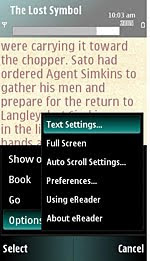
Below are some sample screenshots showing our eReader software. Reading eBooks on your Symbian Smartphone is easy!


Latest version: 3.0.3


Clickshere1.
Alternatehere


MelonMobile Advanced Battery Saver v1.00.25 S60v3 v5


Extend the life of your phone battery up to 30%!
Do you have days when your battery runs low too quickly? Do you sometimes forget your charger and wonder if your phone will last until the end of the day? Advanced Battery Saver will help you get the most out of your battery and stay connected longer!

With Advanced Battery Saver you can adjust the power-consumption of your phone functions, services and application depending on your needs. Use Advanced Battery Saver to get up to 30% more uptime for your phone by cutting down "battery eaters" you don’'t use all the time such as Bluetooth, vibration, lights, etc. You can also create and save your own power-saving modes to customize the power-saving according to your personal preferences.

Battery-optimizing modes

* Advanced Battery saver adjusts the power-consumption of the following phone functions: lights, vibration, network, Bluetooth, Internet connection, sounds and applications.
* Three predefined power-saving modes, Saver off, Basic saver and Max saver, help you quickly switch your power-saving configuration
* Option to define your own power-saving modes to extend the life of your battery by selecting which phone functions and applications to shut down according to your needs
* The power-savings chart allows you to compare the remaining battery life for the currently selected power-saving mode with that of the predefined modes


Auto-Saver Mode
With the Auto-saver feature you can set your phone to automatically switch to your preferred power-saving mode. Specify the battery level (in bars) at which you want to start saving power, and let Advanced Battery Saver do the rest. Supported languages
Advanced Conference Call is available in English, French, Italian, German, Spanish and Bulgarian.

Clickshere2.

HugeMatrix AudioCube.v1.3.98.S60v3/v5


AudioCube is a powerful audio process tool for Nokia S60 3rd/5rd Smartphone. It has two main
features, one is quick extraction, and the other is conversion. It supports many audio file formats, such as
wav, aac, amr, mp3, wma, aiff etc.You can use AudioCube to convert your music or ringtone to other
format, and share them with your friends who may have a phone but not support yours. Whole mp3 song
conversion can work fine, but not suggestion, it is very time consuming because of the
Smartphone limited process ability.It ’s very fun that you can use AudioCube to make your private
phone ringtones. It is very simple.Just use AudioCube extract a section of music from your favorite song,
save it, and then set it as your phone ringtone.If you are not familiar with audio conversion, and have no knowledge
about sample rate,bit rate, channels etc, you can also do your audio conversion well by using default
converter.The default converter provides default setting for each audio codec.

Support Devices:
Compatible with all S60 3rd/5rd Edition phones.

Features:
Audio & music file explorer
Play audio & music
Quick extract Audio & music from existing file

Conversion between different formats

Support wav, aac, mp3, amr, wma,etc

Support customize conversion (bitrate, samplerate, output formats and record time).


NOTE - Wma codec doesn't work properly so don't convert your music files to wma!


Clickshere1.
Alternatehere2.

LCG SmartMovie 4.15 S60 v5


Features
  • Standard AVI format, allowing you to preview converted files on your PC
  • Also plays MP4V, FLV and 3GP file formats
  • Player uses the phone screen in portrait or landscape mode, utilizing the full screen size of the device
  • Rescaling of video to utilize the full screen area
  • Support for subtitles - allowing you to watch movies in different languages
  • Quality rescale algorithm in player, delivering best possible picture quality
  • Customizable video player (brightness, language, volume, and more)
  • User-friendly interface - watch movies, don't waste time configuring obscure settings.
Alternatehere

Avis Folder Size v1.0.0 S60v3 S60v5


Description:
Program for estimate space consumed by any folder.

Features: simple file browser;
automatic counting of sizes;
autosort by size;
delete function.

Download to PC Clickshere

Winrar+Plugin 0.01 S60v3 S60v5 Symbian S60 v5 [i8910HD / 5800 / N97] Apps


Winrar+Plugin 0.01 S60v3 S60v5

Installing this small application your phone recognizes and opens rar files by default system.

You can also open downloaded rar files from your default or opera browser.

Note:
You must uninstall freeunrar first otherwise you'll get an unable to install error message

Download to PC clickshere

Friday, January 15, 2010

Data Quota v1.21 S60v5 SymbianOS9.4 Signed


Shows how much of your packet data quota you've used so far this month.

This application simply shows how much of your packet data quota you've used so far this month.

On the first of each month (or whenever your quota resets on billing day), clear the packet data counter. For example: Tools -> Log -> Packet data -> Options -> Clear counters.

Download to PC Clickshere

Symantec Mobile Security 4.0 s60v5


Symantec Corp. (Nasdaq: SYMC), the global leader in information security, today announced Symantec Mobile Security 4.0 for Symbian. As the only security solution for Symbian OS™ mobile devices to provide integrated antivirus and firewall technologies, Symantec Mobile Security 4.0 for Symbian protects Symbian OS-based Series 60 and Series 80 smartphones, such as the Nokia 9300 and 9500 enterprise devices, from network intrusions as well as from viruses, Trojan horses, and worms.
Symantec

“To ensure that individuals and businesses are protected in an increasingly wireless environment, Symantec is delivering targeted solutions to address the emerging virus and security threats brought by pervasive mobile communications,” said Sarah Hicks, vice president, Strategic Opportunities, at Symantec. “Through solutions such as Symantec Mobile Security for Symbian, Symantec is helping ensure that consumers and enterprises have the most effective and prudent tools for thwarting the growing number of wireless attacks.”

Symantec Mobile Security 4.0 for Symbian is available as a two-year downloadable service for users of select Nokia and Panasonic smartphones. In addition, a free 60-day trial version of Symantec Mobile Security 4.0 for Symbian is available for download from the Symantec website.
Features :
- Highlighted Features and BenefitsScans and removes viruses
- Blocks unauthorized access
- Updates your protection wirelessly

Download to PC Clickshere

Alternatehere

TTpod 3.5.1 S60V5 Skins collection s60v3v5

The ttpod skin collection by me all the skins are just AWESOME
THE first one Winamp Bento..

The second one is The sony XK series....IT HAS 4 different skins...all superb..

The third one is a Foobar skins{2 skins pure black and fooobar black}..

The fourth is a collection of 4 skins:


So overall this collection contains 11 AWsome skins for ttpod 3.5.1 S60v5........

INSTALLATION

Installation is just simple and you just need to extract the .zip archive into E:/ttpod/skin/v4/ ..... and its done.....
Voila u have just got new 11 skins for your ttpod

AND YEAH ALL SKINS ARE IN ENGLISH...
Note: For TTpod Applications/player here


Download to PC Clickshere

Thursday, July 2, 2009

Spytooth


Spytooth is a
Java application for mobile phones which allows you to explore and save every [COLOR=#2B65B0 ! important]bluetooth device[/color] around you (mobiles, cars, notebook...).
Spytooth tells you also the date (hours,minutes,day,month and year) when the [COLOR=#2B65B0 ! important]bluetooth[/color] device has been discovered

Phone Remote Control v5.2 RC1 Regged


Phone Remote Control 5.2 with WiFi support. Turn your Bluetooth or WiFi enabled mobile phone into a generic PC Remote Control!

- Control iTunes, PowerPoint, Mouse, WinAMP, Windows Media Player and much morews Media Player and much more
- See the actual desktop in your phone
- Create your own applications via Keymaps or VB and JScripts
- Connect over WiFi or Bluetooth
- No Bluetooth configuration needed
- Supports all PC Bluetooth solutions Toshiba, Windows, BlueSoleil and Widcomm/Brodacom

Use Phone Remote Control (previously Bluetooth Remote Control) both for buisness and pleasure! Give PowerPoint presentation and see the actual slides in the phone. Change songs that are currently being played on ITunes or Media Player, browse for artists, albums, change volume and much more..

Phone Remote Control is a true universal remote control. It allows the user to modify the current behaviour as well as add support for new applications. You can add support by writing Java or VB scripts, defining key maps and file actions. With key maps the user can very easy and fast define application actions and link them to any buttons on the mobile phone.

Phone Remote Control is a true universal remote control. It allows the user to modify the current behaviour as well as add support for new applications. You can add support by writing Java or VB scripts, defining key maps and file actions. With key maps the user can very easy and fast define application actions and link them to any buttons on the mobile phone.

Phone Remote Control is free to try for as long as you want. The demo version provides a limited number of actions before you are disconnected and must reconnect. The full version can be purchased and registered securely from within the program.

New in Ver 5.2 RC1 -
*Several critical bugs corrected running the program on Vista.
*Minor bug and UI changes

http://www.4shared.com/file/115472550/a508fb49/phoneremotecontrol52.html

Drakkarious Certificate builder, build your own certificate


In the attached file you'll find everything you need to build your own certificate from scratch without having to use anything, you will need nothing more than the package, no internet connection, no nothing, just the package...


Please post your results, it has been tested, it is working, it has been done by me, no other credits will be given except for my friend nicesoni_ash that gave me many ideas about how a certificate works ^^...


Please.
Open tutorial.doc and follow EXACTLY what is mentioned.


Drakkarious Certificate builder.rar

Drakkarious Certificate builder Tutorial in html.zip

TTPod 3.3.1 Skins, XpressMusic


Features:-
1. Mini player effects the use of relief
2. Mini player increases, the contents of the increase, an increase of the spectrum, song name and artist
3. There are subtle changes in small icons
4. To adjust the status of the position, that is, "is to connect the network to download the lyrics are ..."," ..." and so on show the location of
5. Background changed to 16, the effect is the same as the original 24, greatly reduces the memory size of the skin, will not play music card
XMblack.rar (140.75 KB)
XMblue.rar (182.67 KB)
XMgreen.rar (140.94 KB)
XMred.rar (63.88 KB)
XMyellow.rar (113.15 KB)
XM5 color. RAR(1000.56 KB)
Download From:

http://www.ziddu.com/download/488377...olor..rar.html

PIPS v1.5.6 BETA

ew version of PIPS libraries. Tested and works good on my Handset.

P.I.P.S. (P.I.P.S. Is POSIXon Symbian) supplements the existing set of rich native Symbian C++ APIs available on Symbian smartphones with a more industry-standard POSIX-compliant API layer, making Symbian [COLOR=#2B65B0 ! important]software development[/color] more accessible to developers who program using the C language. The POSIX-compliant APIs are generally simpler and more coarse-grained than the native Symbian C++ APIs and will be more familiar to developers with a background in RTOSes, UNIX or Windows. When deciding whether to use the native Symbian C++ or the P.I.P.S. environment, consider what you wish to achieve. In general, if you require tight or rich integration of your software with the smartphone, then Symbian C++ APIs are most appropriate. However, if portability is more important, you should restrict yourself to POSIX APIs. It is expected that the P.I.P.S. libraries will be included in ROM on certain smartphones based on Symbian OS v9.3 and later.

PIPS_v1.5.6BETA.zip

Python for S60 version 1.9.6 Released

his release runs on S60 3rd edition, S60 3rd edition FP1, S60 3rd edition FP2 and S60 5th edition devices.

The release includes:
----- Installer for Windows platform that includes
----- Getting started guide
----- Nocs signed PyS60 runtime sis which will work on S60 3rdEd, 3rdEdFP1, 3rdEdFP2 and 5thEd devices.
----- Two Nocs signed default capability set PythonScriptShell sis files.
----- Nocs signed high capas PythonScriptShell sis. This sis file comes with higher capabilities than self signed (SwEvent, WriteDeviceData, ReadDeviceData)
----- Unsigned developer certificate PythonScriptShell sis. This sis file can be used for Symbian signing.
----- Application packaging tool with GUI and README
----- Python HTML documentation updated with S60 module reference
- Separate SDK zips for 3rdEdFP1 and 3rdEdFP2. SDK zip contains both gcce and armv5 link libraries. Python 3rdEdFP2 SDK zip will work fine on S60 3rdEd and 5thEd
- OpenC SDK plugin for 3rdEd devices. This zip file needs to be extracted on top of Python 3rdEdFP2 SDK zip to get Python working on S60 3rdEd SDK.
- Python source code
- OpenSSL source code. This source code is released just to be in complaint with the terms of LGPL licensed software. This source code is
nothing to do with PyS60 software.

What is new when compared with PyS60 1.9.5?
- Support for a virtual 4-way directional pad is added for Canvas and text
widgets. This D-Pad is displayed at the bottom of the screen and this
feauture is enabled by default on touch enabled devices. Currently, this is
supported only in the portrait mode and landscape support will be available
in a future release.
The 'full_max' mode is invalidated by this change and is removed in this
release.

- The modules in the base runtime is more refined and hence the size of
application SIS, created using PyS60 Application Packager is reduced.

- A new chapter is added in the PyS60 documentation (Extending and Embedding
PyS60), that is an end-to-end tutorial for creating 3rd party extention
modules and distributing them.

Corrected defects:
3223 - Floating point formatting/parsing routines on this platform are imprecise
4078 - socket.access_points() returns iapid 0 for lots of entries
4106 - Problems exiting standalone apps
4185 - Calendar module returns end time with time zone offset added to Unix time
4186 - Using rollback in calendar module returns error
4198 - Screen orientation remains landscape after exit, while device was
portrait all the time
4215 - default.py cannot load .pyc files
4216 - sys.exit() doesn't exit Python.

File Type: rar PythonScriptShell_1.9.6_3_0.rar (986.3 KB, 50 views)
File Type: rar PythonScriptShell_1.9.6_3_2.rar (986.3 KB, 45 views)
File Type: rar PythonScriptShell_1.9.6_unsigned_devcert.rar (984.5 KB, 43 views)
File Type: rar PythonScriptShell_1.9.6_high_capas.rar

True Caller


Have you ever wanted to know who is calling before answering?
Now you can!
TrueCaller_S60_3_v_1_0.rarrbytony

Monday, June 22, 2009

PhotoFusion


PhotoFusion is a camera application for mobile camera phones that creates high quality panoramas and gives your photos that extra touch of finesse.

PhotoFusion replaces the standard camera application and adds both high-end professional functionality and cool features such as 4x digital zoom, real panorama creator, funny face filters and much more!

PhotoFusion Main features
By using one of the 5 main features you will be able to take that special picture you always dreamed about.

# Vertical panorama – enables you to create amazing vertical panoramas.

# Horizontal panorama – enables you to create up to 360° breathtaking horizontal panoramas.

# 4x Digital Zoom – enables up to 400% zoom into details in photos.

# Funny filters – enables you to give your personal touch to photos.

# Settings – a mode set that enable you to improve and optimize your images.

DOWNLOAD-photofusion-os6

DOWNLOAD-photofusion-os7

DOWNLOAD-photofusion-os8

Wednesday, June 3, 2009

Antivirus S60

Mobile Antiviruses (All Versions)

6 Mobile Antiviruses (All Versions) | 8.27Mb
This collection contains 26 mobile antiviruses for all models...


Symbian OS 6 - 7 - 8
--------------------------------
Anti Commawarrior
Anti Cabir
Avira Antivirus
Bitdefender Antivirus
BullGuard Antivirus
Commander Antivirus
Disinfector
F-Secure Antivirus
Kaspersky Antivirus
McAfee Antivirus
NetQin
Norton Antivirus
Panda Antivirus
Simworks Antivirus
Smobile VirusGuard
Symantec Antivirus
TrendMicro Mobile Security
Zeon Antivirus

Symbain OS 9.1 & 9.2
-----------------------------------
exo Virus Stop
F-Secure
Jiangmin Antivirus
Kasperksy Antivirus
NetQin Antivirus
TrendMicro Mobile Security

Download

Friday, May 22, 2009

Dos Box For All

hi all,
i've finally gotten my s60 (wincw emu for now) build to run - which has been done before -, and also to run a dos game (magic candle) - which i'm not so sure has been done.
anyway, if all goes well, there will be some updates and hopefully a sisx release soon...
here's a shot :-)
cheers!


ok, lets try this. here's something adventurous people might like to test drive.
not sure about system requirement, i would guess you need at least a 3rd edition s60 device, and having a minimum 320x240 (either orientation) display is probably a good start.
the release includes:
-my gcce release build,
-the s60 sdl binary release,
-nokia's openc redists (the redistribution license document is included, if you don't agree to the terms within, don't use them! from my limited understanding this should be ok, if not, let me know and i'll kill the post).
-example dosbox.conf and mapper.txt
-"detailed" :-) instructions in README.TXT
DO READ THE README.TXT !!!

i've also built a slim version...
those with memory issues should give this a try...
see the readme.txt for the specifics.
dependencies not included, download them for the first release (post on one of the previous pages).


Release Notes :


i built this release using the 3rd edition sdk, even though i tested the new touch-ui specific functions on the 5th edition sdk emulator build. i really don't know if these 3rd ed builds will work on a 5th ed device like the 5th emu builds did. i can (and will if necessary) release a 5th edition phone release build (though i wont be able tot test that build, for lack of hardware). so, 5800 owners, "feed-me-back", please!

DO I NEED THIS?

if you are using a 5th ed touch-ui device (like the 5800), or have a higher than qvga resolution, then ABSOLUTELY! if your device is a 3rd ed qvga, you only need this if you want the rotate screen function, and/or want easy per-game input mapping (you know you do! :-) notes on scalers:


using scalers other than none will probably have some negative impact on performance. there is probably no pointin using scalers on qvga devices. they're intended for upscaling to qhd (and similarly high) resolutions. don't bother with gl if your device is unaccelerated. notes on the virtual keyboard (for touch-ui):


i could only test this on the 5th-ed sdk emulator. (you still haven't donated a 5800, or enough cash for me to buy one :-) that being said, consider the feature BETA. (don' hate if it don' work!) i really wish a dev with device access would join. you'll need to draw your own overlay bitmap and define your own keys. if you've been around, you'll get the hang of it... and earn the right to call yourself a POWER-USER (!!!) ;-)


Changes:

changes from release 20090305:


- s60mapper -previously 'premapper' - now implemented as 's60map.com' dos command (you can define mappings per game, and load them in the batch file you launch the game with)

- definition of virtual keyboards for touch-ui devices now possible in s60mapper see comments in provided 'virtkeybmap.txt' example for more information

- added various screen scaling engines (software, s60, opengl/gles) primarily intended for qhd (640x360) devices. see provided 'dosbox.conf' comments

- rotate screen 180 degree option added (or resurrected) by popular demand for n95/96ers!

Dosbox_s60_20090504_full-26slim_together.zip

PowerMP3 13 Skins by Slavasyrota


Here are 13 skins (Aimp_red, Carbon, iPhone light, [COLOR=#2B65B0 ! important]iTunes[/color], iTunes black, Modern, Night Pearl, Over_blue, Walkman, Winamp, Winamp modern, WinampAOLMusic, ZX_Modern) for PowerMP3 music player. Works on 1.0x and 1.10.
Put folders with skins to E:\Shared\PowerMP3\Skins

PowerMP3Skins.zip

 
Design by Free WordPress Themes | Bloggerized by Lasantha - Premium Blogger Themes | Online Project management