Showing posts with label S60v5 Applications. Show all posts

Sunday, January 17, 2010

eReader for Symbian S60v5 3.0.3

eReader is an application used to read eReader eBooks on your Symbian Smartphone.


eReader has also earned Symbian Signed Certification. As a Symbian certified application, our eReader has been independently tested to follow industry-agreed quality guidelines. As a customer, you can rest assured that our eReader is designed and tested to enhance your eReading experience.

There is no charge to download and use our free eReader software. In addition to the books included with our eReader Pro application, eReader Pro also allows customers to:

* Use reference books to fully utilize their eReader!
* Take advantage of our Auto Scroll feature to enhance their eReading experience.
* Benefit from additional themes to customize your eReader!
* Adjust several display features to personalize your eReader such as text justification and line spacing.

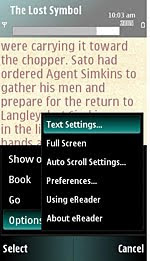
Below are some sample screenshots showing our eReader software. Reading eBooks on your Symbian Smartphone is easy!


Latest version: 3.0.3


Clickshere1.
Alternatehere


MelonMobile Advanced Battery Saver v1.00.25 S60v3 v5


Extend the life of your phone battery up to 30%!
Do you have days when your battery runs low too quickly? Do you sometimes forget your charger and wonder if your phone will last until the end of the day? Advanced Battery Saver will help you get the most out of your battery and stay connected longer!

With Advanced Battery Saver you can adjust the power-consumption of your phone functions, services and application depending on your needs. Use Advanced Battery Saver to get up to 30% more uptime for your phone by cutting down "battery eaters" you don’'t use all the time such as Bluetooth, vibration, lights, etc. You can also create and save your own power-saving modes to customize the power-saving according to your personal preferences.

Battery-optimizing modes

* Advanced Battery saver adjusts the power-consumption of the following phone functions: lights, vibration, network, Bluetooth, Internet connection, sounds and applications.
* Three predefined power-saving modes, Saver off, Basic saver and Max saver, help you quickly switch your power-saving configuration
* Option to define your own power-saving modes to extend the life of your battery by selecting which phone functions and applications to shut down according to your needs
* The power-savings chart allows you to compare the remaining battery life for the currently selected power-saving mode with that of the predefined modes


Auto-Saver Mode
With the Auto-saver feature you can set your phone to automatically switch to your preferred power-saving mode. Specify the battery level (in bars) at which you want to start saving power, and let Advanced Battery Saver do the rest. Supported languages
Advanced Conference Call is available in English, French, Italian, German, Spanish and Bulgarian.

Clickshere2.

HugeMatrix AudioCube.v1.3.98.S60v3/v5


AudioCube is a powerful audio process tool for Nokia S60 3rd/5rd Smartphone. It has two main
features, one is quick extraction, and the other is conversion. It supports many audio file formats, such as
wav, aac, amr, mp3, wma, aiff etc.You can use AudioCube to convert your music or ringtone to other
format, and share them with your friends who may have a phone but not support yours. Whole mp3 song
conversion can work fine, but not suggestion, it is very time consuming because of the
Smartphone limited process ability.It ’s very fun that you can use AudioCube to make your private
phone ringtones. It is very simple.Just use AudioCube extract a section of music from your favorite song,
save it, and then set it as your phone ringtone.If you are not familiar with audio conversion, and have no knowledge
about sample rate,bit rate, channels etc, you can also do your audio conversion well by using default
converter.The default converter provides default setting for each audio codec.

Support Devices:
Compatible with all S60 3rd/5rd Edition phones.

Features:
Audio & music file explorer
Play audio & music
Quick extract Audio & music from existing file

Conversion between different formats

Support wav, aac, mp3, amr, wma,etc

Support customize conversion (bitrate, samplerate, output formats and record time).


NOTE - Wma codec doesn't work properly so don't convert your music files to wma!


Clickshere1.
Alternatehere2.

LCG SmartMovie 4.15 S60 v5


Features
  • Standard AVI format, allowing you to preview converted files on your PC
  • Also plays MP4V, FLV and 3GP file formats
  • Player uses the phone screen in portrait or landscape mode, utilizing the full screen size of the device
  • Rescaling of video to utilize the full screen area
  • Support for subtitles - allowing you to watch movies in different languages
  • Quality rescale algorithm in player, delivering best possible picture quality
  • Customizable video player (brightness, language, volume, and more)
  • User-friendly interface - watch movies, don't waste time configuring obscure settings.
Alternatehere

ThinkChange CompassPro v1.02 S60v5 SymbianOS9.x


Best Compass app for Symbian!

Two fantastic compass styles to choose from.

You can have a compass icon always showing on your phone screen! The size and display area can be easily configured.
Note: You need to Calibrate the Sensor Compass first: Rotating your phone around all axes in a continuous movement.


iSHOOT s60v5 j2me


Blast tanks with a range of high-powered weapons in this artillery combat game that has sold over 10,000 downloads per day on the Apple AppStore. iShoot's constantly changing gameplay and multiplayer features will keep you playing for hours


Download to PC Clickshere

Alternatehere

Avis Folder Size v1.0.0 S60v3 S60v5


Description:
Program for estimate space consumed by any folder.

Features: simple file browser;
automatic counting of sizes;
autosort by size;
delete function.

Download to PC Clickshere

Winrar+Plugin 0.01 S60v3 S60v5 Symbian S60 v5 [i8910HD / 5800 / N97] Apps


Winrar+Plugin 0.01 S60v3 S60v5

Installing this small application your phone recognizes and opens rar files by default system.

You can also open downloaded rar files from your default or opera browser.

Note:
You must uninstall freeunrar first otherwise you'll get an unable to install error message

Download to PC clickshere

Friday, January 15, 2010

FolderPlay v1.8 S60v5 SymbianOS9.4 Signed


FolderPlay (Open Source) is an audio application for Symbian OS, that gapplessly plays back a subset of the directory structure with orientation on lossless formats and supports the following audio file types: WAV, LPCM, FLAC, APE/MAC, AC3, MP3.
Intended for S60 3rd ed. FP1 or newer Symbian OS. Supports and shows WAV, LPCM (MPEG PS), FLAC, APE/MAC, AC3 (MPEG PS), MP3 (built in codec). Gaplessly plays back a chosen subset of the natural directory structure, with subfolders, ordered alphabeticaly. No playlists.

For gapless playback, the files in a play sequence must have the same sample rate and number of channels, but may be of different format. MP3 file will play gaplessly only after another MP3 one with the same parameters. AC3 playback is realtime on devices with FPU (such as N95, 5800, N97...) and uses the latest liba52. FLAC and Monkey's audio use the latest official codecs; the latter must be of fast or normal compression level. In case the playback stops unexpectedly (as experienced with Monkey's audio) use Pause-Resume combination. If an incompatible file is encountered in the play sequence, the playback will halt on this file on 3rd ed. FP1, due to a well-known bug on those phones (no workaround).

Pause-Resume combination should help. Red Button = send to background Green Button = pause/resume and stop (long press) On 5th. edition phones use toolbar instead. The in/out calls will get through, playback will be suspended till the end of the conversation.

Change Log :

1. Added software amplifier. Kicks in after volume has been increased above its maximum.
May be incremented 10 times with 2dB steps. Don't abuse - signal may easily go out of range.
Effective within half a second. Works with software codecs - all except MP3 and AAC.
2. Better CUE handling - upon entering the playing sheet, shows the closest track entry.
3. Fixed some bugs with similar file/folder names.

Download to PC Clickshere

Data Quota v1.21 S60v5 SymbianOS9.4 Signed


Shows how much of your packet data quota you've used so far this month.

This application simply shows how much of your packet data quota you've used so far this month.

On the first of each month (or whenever your quota resets on billing day), clear the packet data counter. For example: Tools -> Log -> Packet data -> Options -> Clear counters.

Download to PC Clickshere

Transparent Orange HomeScreen v1.10 S60v5


Instruction
Just try only 1 sis file Transparent Orange Hs v1.10.sis attached below...

Features:
Enables Transparency for your Orange HomeScreen as in the name
Go to... is renamed to Options & Add bk to Contacts

Installation Instructions:
Uninstall everything regarding this Orange HomeScreen
Restart your Phone
Install Transparent Orange Hs v1.10.sis & restart[only if u have any bugs]

Those Who are getting Update error with Transparent Orange Hs v1.10.sis then try Transparent Orange Hs v1.20.sis... I've removed 00000000.reg & 00000000_0000.ctl from C:\sys\install\sisregistry\1028315f\ in Transparent Orange Hs v1.20.sis....
So no more Update Errors...

Download to PC Clickshere

Symantec Mobile Security 4.0 s60v5


Symantec Corp. (Nasdaq: SYMC), the global leader in information security, today announced Symantec Mobile Security 4.0 for Symbian. As the only security solution for Symbian OS™ mobile devices to provide integrated antivirus and firewall technologies, Symantec Mobile Security 4.0 for Symbian protects Symbian OS-based Series 60 and Series 80 smartphones, such as the Nokia 9300 and 9500 enterprise devices, from network intrusions as well as from viruses, Trojan horses, and worms.
Symantec

“To ensure that individuals and businesses are protected in an increasingly wireless environment, Symantec is delivering targeted solutions to address the emerging virus and security threats brought by pervasive mobile communications,” said Sarah Hicks, vice president, Strategic Opportunities, at Symantec. “Through solutions such as Symantec Mobile Security for Symbian, Symantec is helping ensure that consumers and enterprises have the most effective and prudent tools for thwarting the growing number of wireless attacks.”

Symantec Mobile Security 4.0 for Symbian is available as a two-year downloadable service for users of select Nokia and Panasonic smartphones. In addition, a free 60-day trial version of Symantec Mobile Security 4.0 for Symbian is available for download from the Symantec website.
Features :
- Highlighted Features and BenefitsScans and removes viruses
- Blocks unauthorized access
- Updates your protection wirelessly

Download to PC Clickshere

Alternatehere

Gabor Fetter MicroMaze v1.00 s60v5


Labyrinth games are maybe the best time killers: You guide a ball through a maze just with tilting the phone. MicroMaze attempts to be the best of them with sophisticated graphics, physics and unique gameplay. Challenge your skills and have many hours of fun with 81 challenging levels in 6 worlds!

AAS Review:

Let's be honest here, some marble games can be a bit woolly in their handling and not feel like a real simulation. That's not the case here, MicroMaze is one of the smoothest implementations of the genre I've ever seen on Symbian OS.

It's clear that Fetter knows how to program a game so that it keeps on rewarding the player. There's no feeling of grinding through the numbers, it just stays fresh right until the end. Like most marble games though, it's tough to feel any replay value (beyond passing it to the kids in the back seat of a car journey... which is just evil). There are also enough levels in here to make it great value for money. Definitely recommended.

Download to PC Clickshere

Alternatehere

Nokia Beta Labs Nokia Image Exchange S60v5

Nokia Image Exchange is an exciting, experimental image gallery to make browsing and sharing images fun and easy. It aims to provide a seamless integration of a mobile image gallery application and a corresponding web-service. Image Exchange explores user experience when the mobile phone is enabled with an always-on data connection and utilizes existing contact information as a basis for social networking.

A few notable highlights include: automatic account creation, automatic back up and synchronization of image data, instant sharing, notifications about new images from contacts and a web interface for uploading and downloading images.

Note: The first time you use Image Exchange it may be initially slow as it generates image thumbnails and uploads images onto your private web account. If available, you can use a WiFI network and charger during this period. After initial upload the application should be quite fast.

Notice: Nokia Image Exchange is an experimental research project by Nokia Research Center. For a similar mainstream Nokia service, check out Ovi Share. If network use is enabled Nokia Image Exchange generates data traffic between the mobile phone and the service. The traffic costs depend on your network operator and data plan.

Nokia Image Exchange web service

* The web service has been tested with Firefox, Safari and Internet Explorer 7. Google Chrome and Opera 9 seem to work.

Changelog: v0.98(222)
In this early beta we are also including an option to upload images to Facebook. Feature is found from Send options, but only available if image has been uploaded and published as Facebook requires access to it. We hope to improve the usability of this feature later on as well as to include it to non-touch version. For now, this only works for you own images.

Download to PC Clickshere

Alternatehere

HTC Sense UI FOR n5800


Installation guide:

1st Download & Install GDesk attached below.

Launch GDesk,

Tap anywhere on the screen and choose Load Design.

Select the file which u've extracted from archive

[HTC Sense Hero attached below].

Tap again anywhere and Select Done.

After applying the theme:
Apply full screen
applly replace menu
options........

1.Download to PC Clickshere

2.Alternatehere

3.Alternatehere

XPRESS locker key v1.1 EN s60v5


Software utility to create sound when open or lock down

can create your own sound style monopoly

creating

all audio format wav copy on a memory card then install and set

1.Download to PC Clickshere


2.Alternatehere
3.Alternatehere

Yellow Pages v1.00 S60v3v5 Symbian OS9x Unsigned


ABOUT
Yellow Pages auto locates where you are and gives you relevant search results based on your location. Compare Yellow Pages to other applications and you’ll quickly realize why our OneTap® search and usability optimization technology saves you valuable time and is easier to use. It also includes quick search shortcuts for most commonly used terms. Similar applications make you type out almost everything you are searching for, and your location. Use the Yellow Pages once and you will wonder how you ever got along without it.

This YellowPages application is owned by Avantar, a sister company to Yellow Pages Directory. With years of experience in the interactive yellow pages industry, our mobile application is hands-down a must-have 1st screen app for your mobile device.

FEATURES
- Auto detects your current location
- Interactive map with driving directions to each business
- Modify your default location with one tap
- Results are displayed for businesses in your vicinity
- Tap on the plus sign to add business info to your Contacts
- Tap on the map for driving directions
- Business phone numbers with a single tap-to-call option
- Quick Searches: Shortcuts for most commonly used search terms like Pizza, Auto Services, Doctors, Restaurants, etc.

COUNTRIES
- United States
- Canada
- Other: Some features may not work properly and may require that you set the location

OTHER AVANTAR APPLICATIONS
- OneTap Movies
- Munch
- Showtimes
- AirYell

Note: We appreciate your suggestions and customer service questions directed to support@avantar.us. Please keep them coming. You help to make our apps better.

Download Clickshere

Fingertip Access Ultimate SMS v.3.2.3 S60v3 v5


Ultimate SMS satisfies all your SMS sending/receiving needs. It keeps all your SMS messages private and safe on your phone. It schedules automatic SMS sending for you. It filters out unwanted SMS by senders and contents you specify. It notifies you of new incoming SMS using customized alert tones for different phone numbers / contacts of your choice. It also can send encrypted SMS to people in a list of you own. It lets you create template SMS and assign hotkeys to those templates so that you send a predefined SMS by simply pressing some keys on your phone screen. It groups all your messages into conversation thread based on senders and receivers so that you can view messages in context. It also reminds you of unread SMS periodically. It generates monthly SMS usage report for you. It can automatically reply to incoming SMS with your specified message according to your specified time schedules. It also will automatically forward incoming SMS to your specified mobile number based on your specified time schedules.


You can still use native messaging app to send messages and they will be automatically imported into the application

With Ultimate SMS, you can also export all your incoming and outgoing SMS on your phone to a text file. All your incoming and outgoing messages are encrypted inside some internal database, and no body, no other applications can access those messages.

Please download the user manual to see details on how to use the application such as customizing incoming alert tones.

Whats New :

* * Add support of using Green key to trigger sending of messages in editor screen
* * Add support of playing a long tone in full length.
* * Fix the bug that enabling delivery report and auto reply together causes sending of messages in loop.
* * Fix the bug that pressing up/down key in empty conversation screen and schedule screen causes closing of the application.
* * other minor bug fixes.


Download to PC Clickshere

Alternatehere

Change your Bootscreen to GIF s60v5


Requirements :
Your phone must be hacked.

I've never tried this on another phone except in my 5800 so use at your own risk (basically the same as the risk of copying the files yourselves)

So, if anyone would like to know how to write to the cenrep folder (10202be9) for various mods, please just ask.

Also to genio_mex for providing me with the proper line to edit to increase the volume of the startup sound.

Also, if you'd like to customize your own bootscreens just replace the ones in c:\boot with your own startup.mp3 and startup.gif

Download to PC Clickshere
Alternatehere

KEYnetik Hi-N-Bye v1.20 S60v5


Hi-N-Bye is the ultimate motion based phone call application which allows the user to use hand gestures to control their phone calls. The application offers all possibilities you will need on the daily basis with your phone.

Features:
-Answer phone calls with a simple pick-up gesture
-End phone calls with a simple hang-up gesture
-Turn loudspeaker ON/OFF with shake or push gesture
-Swap between two calls with shake or push gesture


Download to PC Clickshere

 
Design by Free WordPress Themes | Bloggerized by Lasantha - Premium Blogger Themes | Online Project management